---
title: Auto reverse two spoken languages with Babelfish
description: Instantly Auto reverse translations for two different languages
---
[Skip to content](https://knowledge.xrai.glass/auto-reverse#main-content)
English
Show submenu for translations
[More support](https://knowledge.xrai.glass/kb-tickets/new)
[](https://knowledge.xrai.glass/)
Open main navigation
Close main navigation
- English
Show submenu for translations
- [More support](https://knowledge.xrai.glass/kb-tickets/new)
- [Submit a help ticket](http://xrai.glass/contact)
[Submit a help ticket](http://xrai.glass/contact)
How can we help?
- There are no suggestions because the search field is empty.
1. [Knowledge Hub](https://knowledge.xrai.glass/)
2. [Using XRAI](https://knowledge.xrai.glass/using-xrai)
3. [Languages & Translation](https://knowledge.xrai.glass/using-xrai#languages-translation)
August 27, 2024
# Auto reverse two spoken languages with Babelfish
## Instantly Auto reverse translations for two different languages
The Babelfish feature enables you to automatically translates speech from one language to the other, ensuring seamless communication.
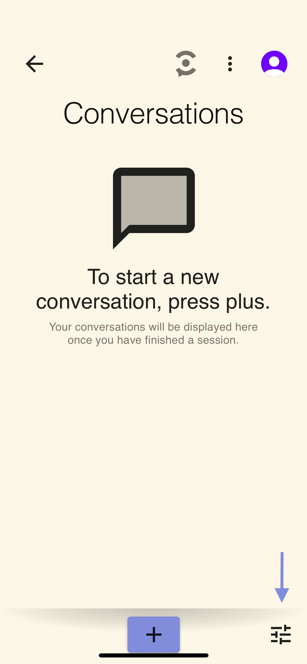
To begin, start by going to the Quick Settings menu:
**
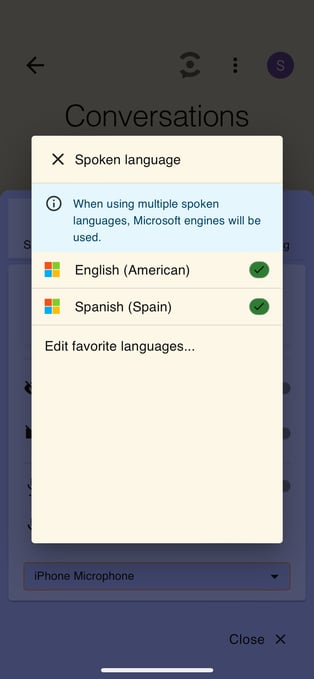
Next, go to Spoken Language and select two languages, such as Spanish and English:
Finally, go to Subtitle Language and select Auto reverse:
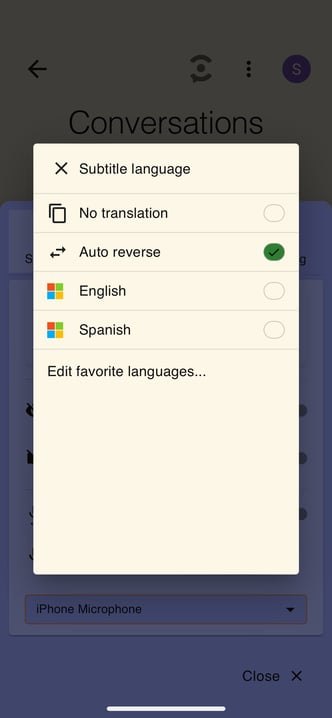
Now, when someone speaks in Spanish, it will automatically translate into English, and vice versa. Happy translating!
- [Getting started](https://knowledge.xrai.glass/getting-started)
- [Using XRAI](https://knowledge.xrai.glass/using-xrai#main-content)
- [AI Assistant](https://knowledge.xrai.glass/using-xrai#ai-assistant)
- [Languages & Translation](https://knowledge.xrai.glass/using-xrai#languages-translation)
- [Augmented Reality (AR)](https://knowledge.xrai.glass/using-xrai#augmented-reality-ar)
- [Transcription & Conversations](https://knowledge.xrai.glass/using-xrai#transcription-conversations)
- [Using XRAI Stream](https://knowledge.xrai.glass/using-xrai-stream)
- [XRAI AR2](https://knowledge.xrai.glass/xrai-ar2)
- [Smart Glasses](https://knowledge.xrai.glass/smart-glasses#main-content)
- [Using Nreal](https://knowledge.xrai.glass/smart-glasses#using-nreal)
- [XREAL Beam](https://knowledge.xrai.glass/smart-glasses#xreal-beam)
- [Troubleshooting](https://knowledge.xrai.glass/troubleshooting#main-content)
- [Troubleshooting XRAI Glass](https://knowledge.xrai.glass/troubleshooting#troubleshooting-xrai-glass)
- [Samsung](https://knowledge.xrai.glass/troubleshooting#samsung)
- [Nreal (Nebula)](https://knowledge.xrai.glass/troubleshooting#nreal-nebula)
- [Funding](https://knowledge.xrai.glass/funding#main-content)
- [United Kingdom](https://knowledge.xrai.glass/funding#united-kingdom)
- [FAQs](https://knowledge.xrai.glass/faqs)
- [Subscriptions](https://knowledge.xrai.glass/subscriptions#main-content)
- [iOS](https://knowledge.xrai.glass/subscriptions#ios)
- [XRAI AR One](https://knowledge.xrai.glass/xrai-ar-one#main-content)
- [FAQ](https://knowledge.xrai.glass/xrai-ar-one#faq)
- [Hardware](https://knowledge.xrai.glass/xrai-ar-one#hardware)
- [XRAI for Teams](https://knowledge.xrai.glass/xrai-for-teams#main-content)
- [Using XRAI for Teams](https://knowledge.xrai.glass/xrai-for-teams#using-xrai-for-teams)
[](http://xrai.glass)
251 Little Falls Drive, Wilmington, Delaware, 19808
[mailto:email@email.com](mailto:email@email.com)
Copyright © 2025, XRAI Inc
```json
{
"@context" : "https://schema.org",
"@type" : "VideoObject",
"caption" : {
"@type" : "MediaObject",
"contentUrl" : "https://knowledge.xrai.glass/media-transcripts/113511606458/en.vtt",
"inLanguage" : "en",
"name" : "en Captions"
},
"contentUrl" : "https://25829868.fs1.hubspotusercontent-eu1.net/hubfs/25829868/Auto%20Reverse%20Final%20%20(1).mp4",
"dateModified" : "2026-02-26T16:08:45.931Z",
"duration" : "PT37.965S",
"height" : 1080,
"name" : "Auto Reverse Final (1)",
"thumbnailUrl" : "https://25829868.fs1.hubspotusercontent-eu1.net/hubfs/25829868/Auto%20Reverse%20Final%20%20(1).mp4/medium.jpg",
"uploadDate" : "2024-08-27T17:44:13.202Z",
"width" : 1920
}
```