---
title: Switch to free offline transcription with XRAI Glass Essentials (iOS)
description: If you have run out of pro minutes and want to continue subtitling your conversations, don't worry, we have you covered. Find out how to enable free transcription.
---
[Skip to content](https://knowledge.xrai.glass/switch-to-free-transcription-with-xrai-glass-essentials-0#main-content)
English
Show submenu for translations
[More support](https://knowledge.xrai.glass/kb-tickets/new)
[](https://knowledge.xrai.glass/)
Open main navigation
Close main navigation
- English
Show submenu for translations
- [More support](https://knowledge.xrai.glass/kb-tickets/new)
- [Submit a help ticket](http://xrai.glass/contact)
[Submit a help ticket](http://xrai.glass/contact)
How can we help?
- There are no suggestions because the search field is empty.
1. [Knowledge Hub](https://knowledge.xrai.glass/)
2. [Using XRAI](https://knowledge.xrai.glass/using-xrai)
3. [Transcription & Conversations](https://knowledge.xrai.glass/using-xrai#transcription-conversations)
March 31, 2026
# Switch to free offline transcription with XRAI Glass Essentials (iOS)
If you have run out of pro minutes and want to continue subtitling your conversations, don't worry, we have you covered.
**Please note:** translation is not included within XRAI Essentials. To use translation, you will need to purchase pro minutes.
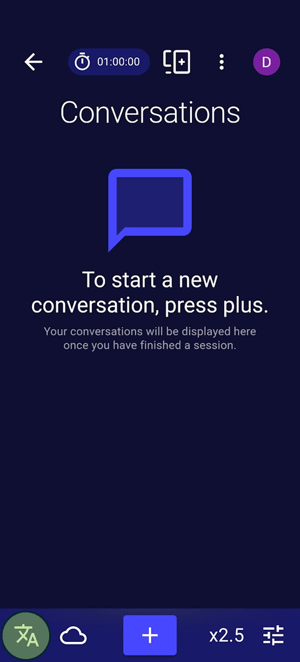
1. To switch to free offline transcription, press the language/engine icon in the button left:
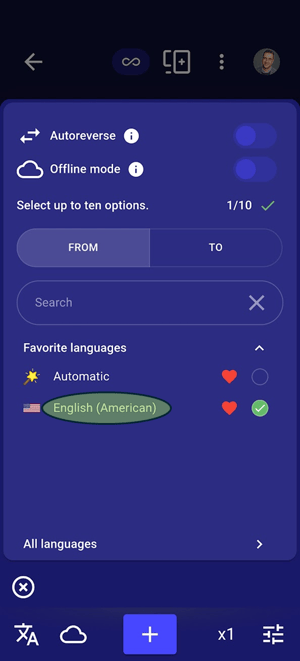
2. Tap the language you are using:
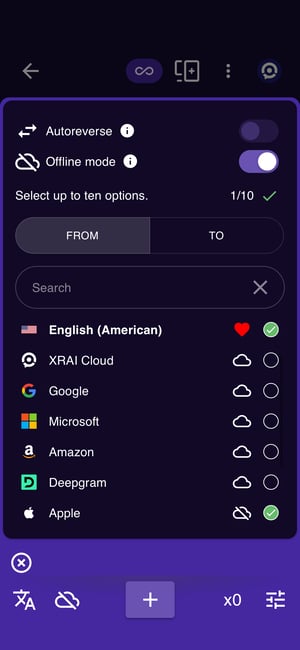
3. Then select **Apple** as your transcription provider.
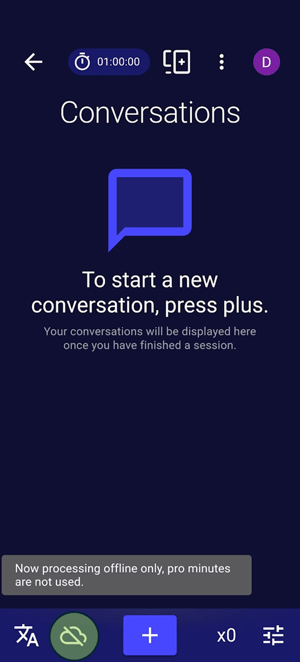
4. You will now see the icon in the bottom left change to tell you that you are now using offline processing and your meter rate will drop to **x0.**You can toggle any time between online and offline by tapping the symbol at the bottom.
 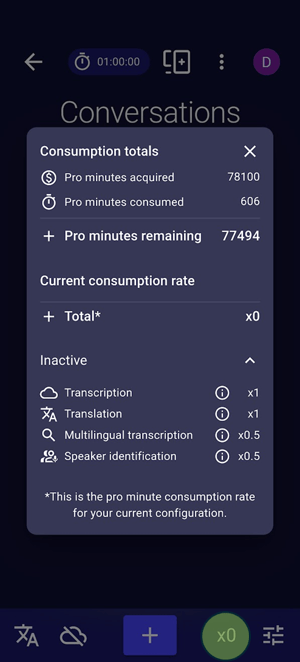
Congratulations, you are now back to subtitling.
**Please Note:** free transcription on your phone is dramatically less accurate that transcription in the cloud with pro minutes. No, the app didn't just get dramatically worse, the transcription engine did. For the same experience you have been getting until now, you can subscribe or buy top-up packs [here](http://xrai.glass/pricing).
Caution: Offline transcription is powered by LLM-based AI. If you don't continue to talk, it can sometimes transcribe words which were not spoken. In can sometimes invent words that were never spoken. Exercise caution and always use the Cloud transcription providers for the best accuracy.
- [Getting started](https://knowledge.xrai.glass/getting-started)
- [Using XRAI](https://knowledge.xrai.glass/using-xrai#main-content)
- [AI Assistant](https://knowledge.xrai.glass/using-xrai#ai-assistant)
- [Languages & Translation](https://knowledge.xrai.glass/using-xrai#languages-translation)
- [Augmented Reality (AR)](https://knowledge.xrai.glass/using-xrai#augmented-reality-ar)
- [Transcription & Conversations](https://knowledge.xrai.glass/using-xrai#transcription-conversations)
- [Using XRAI Stream](https://knowledge.xrai.glass/using-xrai-stream)
- [XRAI AR2](https://knowledge.xrai.glass/xrai-ar2)
- [Smart Glasses](https://knowledge.xrai.glass/smart-glasses#main-content)
- [Using Nreal](https://knowledge.xrai.glass/smart-glasses#using-nreal)
- [XREAL Beam](https://knowledge.xrai.glass/smart-glasses#xreal-beam)
- [Troubleshooting](https://knowledge.xrai.glass/troubleshooting#main-content)
- [Troubleshooting XRAI Glass](https://knowledge.xrai.glass/troubleshooting#troubleshooting-xrai-glass)
- [Samsung](https://knowledge.xrai.glass/troubleshooting#samsung)
- [Nreal (Nebula)](https://knowledge.xrai.glass/troubleshooting#nreal-nebula)
- [Funding](https://knowledge.xrai.glass/funding#main-content)
- [United Kingdom](https://knowledge.xrai.glass/funding#united-kingdom)
- [FAQs](https://knowledge.xrai.glass/faqs)
- [Subscriptions](https://knowledge.xrai.glass/subscriptions#main-content)
- [iOS](https://knowledge.xrai.glass/subscriptions#ios)
- [XRAI AR One](https://knowledge.xrai.glass/xrai-ar-one#main-content)
- [FAQ](https://knowledge.xrai.glass/xrai-ar-one#faq)
- [Hardware](https://knowledge.xrai.glass/xrai-ar-one#hardware)
- [XRAI for Teams](https://knowledge.xrai.glass/xrai-for-teams#main-content)
- [Using XRAI for Teams](https://knowledge.xrai.glass/xrai-for-teams#using-xrai-for-teams)
[](http://xrai.glass)
251 Little Falls Drive, Wilmington, Delaware, 19808
[mailto:email@email.com](mailto:email@email.com)
Copyright © 2025, XRAI Inc