---
title: How to reset the XRAI AR2 (iOS)
description: Learn how to reset, unpair, and reconnect your XRAI AR2 glasses.
---
[Skip to content](https://knowledge.xrai.glass/reset-ar2-ios#main-content)
English
Show submenu for translations
[More support](https://knowledge.xrai.glass/kb-tickets/new)
[](https://knowledge.xrai.glass/)
Open main navigation
Close main navigation
- English
Show submenu for translations
- [More support](https://knowledge.xrai.glass/kb-tickets/new)
- [Submit a help ticket](http://xrai.glass/contact)
[Submit a help ticket](http://xrai.glass/contact)
How can we help?
- There are no suggestions because the search field is empty.
1. [Knowledge Hub](https://knowledge.xrai.glass/)
2. [XRAI AR2](https://knowledge.xrai.glass/xrai-ar2)
October 23, 2025
# How to reset the XRAI AR2 (iOS)
## This simple reset solves most pairing issues and gets you connected again quickly.
If you’re experiencing connection or pairing issues, try resetting your glasses by following these steps:
****
### **Step one**
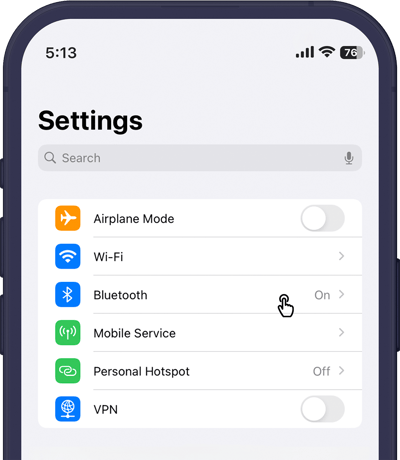
Open your settings on your iOS device, then navigate to your **Bluetooth** settings.
****
### **Step two**
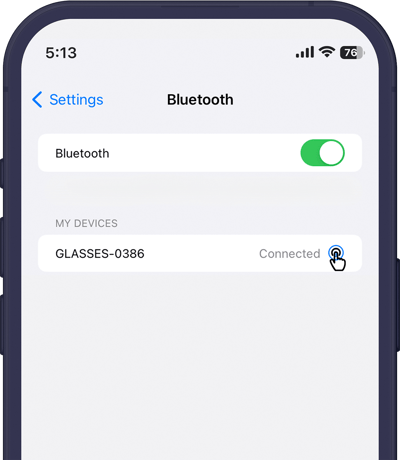
Find your glasses under **My Devices**, then tap the **blue info icon**.
****
### **Step three**
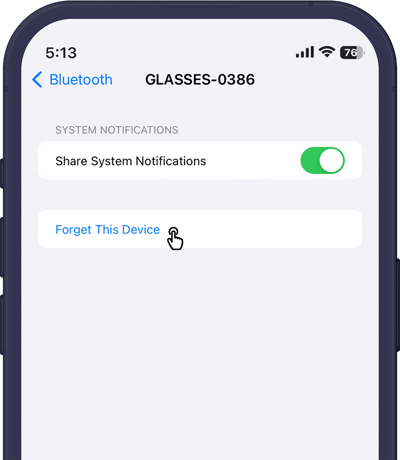
Tap **Forget This Device**. When the confirmation pop-up appears, select **Forget Device** to continue.

### **Step Four**
Finally, restart your glasses by holding the power button for 10 seconds to complete a full reboot. Once they power back on, you can pair them again in the app.
- [Getting started](https://knowledge.xrai.glass/getting-started)
- [Using XRAI](https://knowledge.xrai.glass/using-xrai#main-content)
- [AI Assistant](https://knowledge.xrai.glass/using-xrai#ai-assistant)
- [Languages & Translation](https://knowledge.xrai.glass/using-xrai#languages-translation)
- [Augmented Reality (AR)](https://knowledge.xrai.glass/using-xrai#augmented-reality-ar)
- [Transcription & Conversations](https://knowledge.xrai.glass/using-xrai#transcription-conversations)
- [Using XRAI Stream](https://knowledge.xrai.glass/using-xrai-stream)
- [XRAI AR2](https://knowledge.xrai.glass/xrai-ar2)
- [Smart Glasses](https://knowledge.xrai.glass/smart-glasses#main-content)
- [Using Nreal](https://knowledge.xrai.glass/smart-glasses#using-nreal)
- [XREAL Beam](https://knowledge.xrai.glass/smart-glasses#xreal-beam)
- [Troubleshooting](https://knowledge.xrai.glass/troubleshooting#main-content)
- [Troubleshooting XRAI Glass](https://knowledge.xrai.glass/troubleshooting#troubleshooting-xrai-glass)
- [Samsung](https://knowledge.xrai.glass/troubleshooting#samsung)
- [Nreal (Nebula)](https://knowledge.xrai.glass/troubleshooting#nreal-nebula)
- [Funding](https://knowledge.xrai.glass/funding#main-content)
- [United Kingdom](https://knowledge.xrai.glass/funding#united-kingdom)
- [FAQs](https://knowledge.xrai.glass/faqs)
- [Subscriptions](https://knowledge.xrai.glass/subscriptions#main-content)
- [iOS](https://knowledge.xrai.glass/subscriptions#ios)
- [XRAI AR One](https://knowledge.xrai.glass/xrai-ar-one#main-content)
- [FAQ](https://knowledge.xrai.glass/xrai-ar-one#faq)
- [Hardware](https://knowledge.xrai.glass/xrai-ar-one#hardware)
- [XRAI for Teams](https://knowledge.xrai.glass/xrai-for-teams#main-content)
- [Using XRAI for Teams](https://knowledge.xrai.glass/xrai-for-teams#using-xrai-for-teams)
[](http://xrai.glass)
251 Little Falls Drive, Wilmington, Delaware, 19808
[mailto:email@email.com](mailto:email@email.com)
Copyright © 2025, XRAI Inc