---
title: How to enable basic mode
description: Learn how to enable Basic Mode in the XRAI Glass app to simplify navigation and focus on the most essential features.
---
[Skip to content](https://knowledge.xrai.glass/basic-mode#main-content)
English
Show submenu for translations
[More support](https://knowledge.xrai.glass/kb-tickets/new)
[](https://knowledge.xrai.glass/)
Open main navigation
Close main navigation
- English
Show submenu for translations
- [More support](https://knowledge.xrai.glass/kb-tickets/new)
- [Submit a help ticket](http://xrai.glass/contact)
[Submit a help ticket](http://xrai.glass/contact)
How can we help?
- There are no suggestions because the search field is empty.
1. [Knowledge Hub](https://knowledge.xrai.glass/)
2. [Using XRAI](https://knowledge.xrai.glass/using-xrai)
3. [Transcription & Conversations](https://knowledge.xrai.glass/using-xrai#transcription-conversations)
June 23, 2026
# How to enable basic mode
## Basic Mode simplifies the XRAI Glass app by focusing on the most essential features, making it easier to navigate and use.
****
### Step one
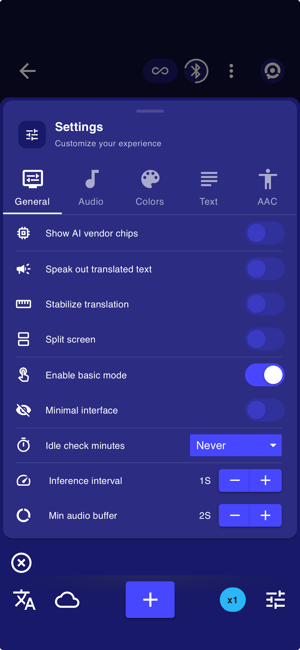
Open the XRAI Glass app and select the **Quick Settings** icon in the bottom-right corner.
Next, scroll to find the **Basic Mode** option and enable the toggle.
### Step two
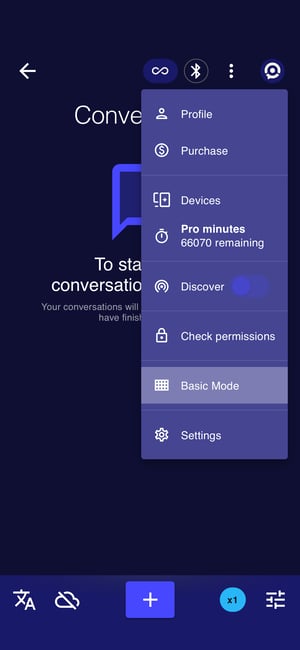
Return to the home screen and select the **profile icon** in the top-right corner.
A new option called **Basic Mode** will now be available. Select **Basic Mode** to continue.
### Step three
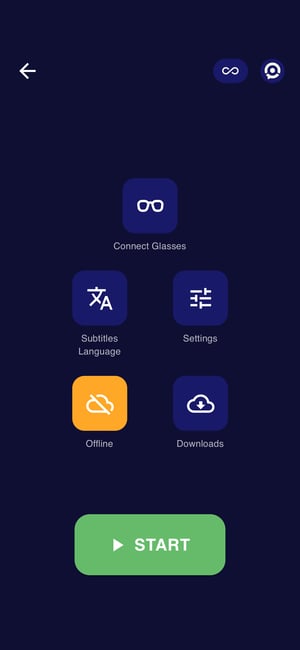
Once enabled, the app will switch to **Basic Mode**, simplifying the interface and making the XRAI Glass app easier to navigate.
- [Getting started](https://knowledge.xrai.glass/getting-started)
- [Using XRAI](https://knowledge.xrai.glass/using-xrai#main-content)
- [AI Assistant](https://knowledge.xrai.glass/using-xrai#ai-assistant)
- [Languages & Translation](https://knowledge.xrai.glass/using-xrai#languages-translation)
- [Augmented Reality (AR)](https://knowledge.xrai.glass/using-xrai#augmented-reality-ar)
- [Transcription & Conversations](https://knowledge.xrai.glass/using-xrai#transcription-conversations)
- [Using XRAI Stream](https://knowledge.xrai.glass/using-xrai-stream)
- [XRAI AR2](https://knowledge.xrai.glass/xrai-ar2)
- [Smart Glasses](https://knowledge.xrai.glass/smart-glasses#main-content)
- [Using Nreal](https://knowledge.xrai.glass/smart-glasses#using-nreal)
- [XREAL Beam](https://knowledge.xrai.glass/smart-glasses#xreal-beam)
- [Troubleshooting](https://knowledge.xrai.glass/troubleshooting#main-content)
- [Troubleshooting XRAI Glass](https://knowledge.xrai.glass/troubleshooting#troubleshooting-xrai-glass)
- [Samsung](https://knowledge.xrai.glass/troubleshooting#samsung)
- [Nreal (Nebula)](https://knowledge.xrai.glass/troubleshooting#nreal-nebula)
- [Funding](https://knowledge.xrai.glass/funding#main-content)
- [United Kingdom](https://knowledge.xrai.glass/funding#united-kingdom)
- [FAQs](https://knowledge.xrai.glass/faqs)
- [Subscriptions](https://knowledge.xrai.glass/subscriptions#main-content)
- [iOS](https://knowledge.xrai.glass/subscriptions#ios)
- [XRAI AR One](https://knowledge.xrai.glass/xrai-ar-one#main-content)
- [FAQ](https://knowledge.xrai.glass/xrai-ar-one#faq)
- [Hardware](https://knowledge.xrai.glass/xrai-ar-one#hardware)
- [XRAI for Teams](https://knowledge.xrai.glass/xrai-for-teams#main-content)
- [Using XRAI for Teams](https://knowledge.xrai.glass/xrai-for-teams#using-xrai-for-teams)
[](http://xrai.glass)
251 Little Falls Drive, Wilmington, Delaware, 19808
[mailto:email@email.com](mailto:email@email.com)
Copyright © 2025, XRAI Inc